11 E-Commerce Best Practices to Boost Conversions

Storyblok is the first headless CMS that works for developers & marketers alike.
E-commerce teams have more ways than ever to attract shoppers, but converting that traffic is getting harder. The customer journey is changing too. Shoppers are asking AI chatbots for recommendations before they ever open a browser tab, and some are letting AI agents complete the purchase on their behalf. But the basics still matter: fast checkout, accessibility, and mobile performance.
Here are 11 best practices to build a store that wins across this changing customer journey, from discovery to purchase.
1. Eliminate major conversion roadblocks at checkout
Cart abandonment remains one of the most stubborn numbers in e-commerce. The global average cart abandonment rate sits at 70.22% in 2026, a figure that has barely moved in over a decade despite major investment in checkout design. The single biggest driver is still unexpected costs—nearly half of shoppers abandon carts because of shipping fees and taxes that only appear at the final step, with mandatory account creation the second most common reason.
The fixes are well understood, just inconsistently applied:
- Offer guest checkout: Reducing checkout steps from five to three can cut abandonment by roughly 27%, and guest checkout alone can reduce it by about 14%.
- Show all costs (shipping, taxes, fees) early, not at the final screen.
- Cut unnecessary form fields: Removing them reduces abandonment by around 12%, and auto-filling customer info adds another 8%.
- Offer the payment methods your audience actually wants: Buy Now, Pay Later options reduce abandonment by about 11%, and for orders over $100 that reduction climbs toward 20–29% depending on age group.
- Keep checkout fast: Stores with sub-two-second checkout load times see roughly 30% lower abandonment.
Mobile is where most of this pain concentrates. Enlarging tap targets, enabling one-tap payments like Apple Pay or Google Pay, and cutting form fields can recover a meaningful share of otherwise-lost mobile sales.
2. Make your store AI-discoverable (GEO)
Search Engine Optimization is no longer the only visibility game to worry about. Today, shoppers are increasingly using tools like ChatGPT, Perplexity, Google's AI Mode, or Copilot to research products. That means product information needs to be understandable not only to traditional search engines, but to the AI systems interpreting and recommending it.
This is Generative Engine Optimization (GEO), sometimes called Answer Engine Optimization (AEO), and it works differently from traditional SEO:
- Traditional search ranks pages, whereas generative search synthesizes a single answer built from structured product data, reviews, and editorial coverage. If your brand isn't clearly represented across those sources, your chances to show up are rather slim.
- Only 17–38% of AI Overview citations come from top-10 Google organic results, according to Ahrefs and BrightEdge research. Ranking well on Google no longer guarantees showing up in AI answers.
- Product pages with complete Schema.org Product markup, including brand, SKU, price, availability, and AggregateRating, are roughly 3.7 times more likely to be cited by AI systems.
What to actually do
- Add complete Product, Offer, and Review schema to every product page, not just your homepage.
- Write product descriptions that answer specific buyer questions directly, rather than leaning on persuasive marketing copy. AI systems can't cite product data trapped in unstructured free-text fields or inconsistent attribute naming.
- Keep prices and availability in sync between your storefront and any feed you expose. Remember that stale structured data can hurt more than having none at all.
- Don't abandon traditional on-page and technical SEO. Clean URLs, fast load times, and solid internal linking still matter for both human visitors and AI crawlers.
Avoid keyword stuffing. It reads badly to humans, and both Google and AI models are increasingly good at penalizing content that's optimized for algorithms instead of people.
3. Get ready for agentic commerce
In September 2025, OpenAI launched Instant Checkout inside ChatGPT, built on the Agentic Commerce Protocol (ACP) developed with Stripe. By January 2026, Google had launched its own Universal Commerce Protocol (UCP) at NRF, later adding multi-item cart support and real-time catalog queries. This allows AI agents in ChatGPT, Perplexity, or Google's AI Mode to query machine-readable catalogs, shortlist merchants they can verify, and complete purchases through a checkout protocol, without the shopper visiting the retailer's site.
A few things worth knowing before you invest heavily here:
- Adoption has been slower than the initial hype suggested. As of February 2026, only around 30 Shopify merchants were actively using ChatGPT's Instant Checkout, partly due to unresolved sales tax handling, and OpenAI sunset the original Instant Checkout in March 2026, pivoting toward retailer-operated checkout flows instead.
- Not every retailer needs to pick one protocol. UCP was designed for compatibility with other standards like MCP, and platforms including Shopify let merchants syndicate the same catalog across ChatGPT, Perplexity, and Copilot from a single setup.
- Checkout.com data shows merchants running both ACP and UCP together see roughly 40% more agentic traffic than those on a single protocol.
- Not every marketplace is playing along. Amazon has blocked OpenAI's crawlers and updated its terms to restrict AI agent activity, which structurally excludes Amazon-only sellers from ChatGPT's shopping results.
What to prioritize now
- Get your product feed genuinely accurate and complete. Real-time price and availability data is the baseline requirement every protocol shares.
- If you're on Shopify, check whether your Agentic Storefronts/catalog syndication settings are switched on.
- If you process payments through Stripe, enabling agentic checkout is a relatively light lift.
- Treat this as additive to your existing channels for now rather than a replacement. AI referral traffic is still a small slice of total e-commerce sessions, though it's growing extremely fast wherever it appears.
The system you choose to manage your content has a big impact on your search engine visibility. Make sure to choose a CMS with powerful SEO features that supports your goals.
4. Go mobile and think beyond the phone
Mobile-first design isn't new advice, but it's still where most stores leave money on the table. One-tap payment options, larger tap targets, faster load times, and fewer form fields can recover 15–25% of otherwise-lost mobile sales.
- Responsive design that adapts cleanly to any screen size without forcing zoom or horizontal scroll.
- Fast loading speed, particularly on slower mobile connections.
- Thumb-friendly navigation with key actions placed within comfortable one-handed reach.
- Minimal clutter—small screens punish busy layouts far more than desktop ones.
- Streamlined mobile checkout, with guest checkout and minimal fields as the default, not the exception.
Consider omnichannel and voice/AR too
Shopping journeys increasingly extend beyond mobile. Shoppers can discover and evaluate products through voice assistants, AR try-on features, and wearables. AI shopping tools such as ChatGPT, Copilot, and Google AI Mode add another channel to consider. Choose platforms and content models that can support new channels without requiring you to rebuild content for each one.
5. Optimize performance
Fast sites convert better, rank better, and frustrate fewer people. To know where you stand, you need real data:
- Google Analytics for tracking bounce rates, page load times, and conversion patterns across your store.
- PageSpeed Insights for page-by-page Core Web Vitals scores, plus recommended fixes for mobile and desktop.
Improving site performance has benefits beyond Core Web Vitals. Faster pages improve the mobile experience and can support better search performance.

Google Analytics is a powerful, popular tool. Using it ranks among the top e-commerce best practices for most businesses.
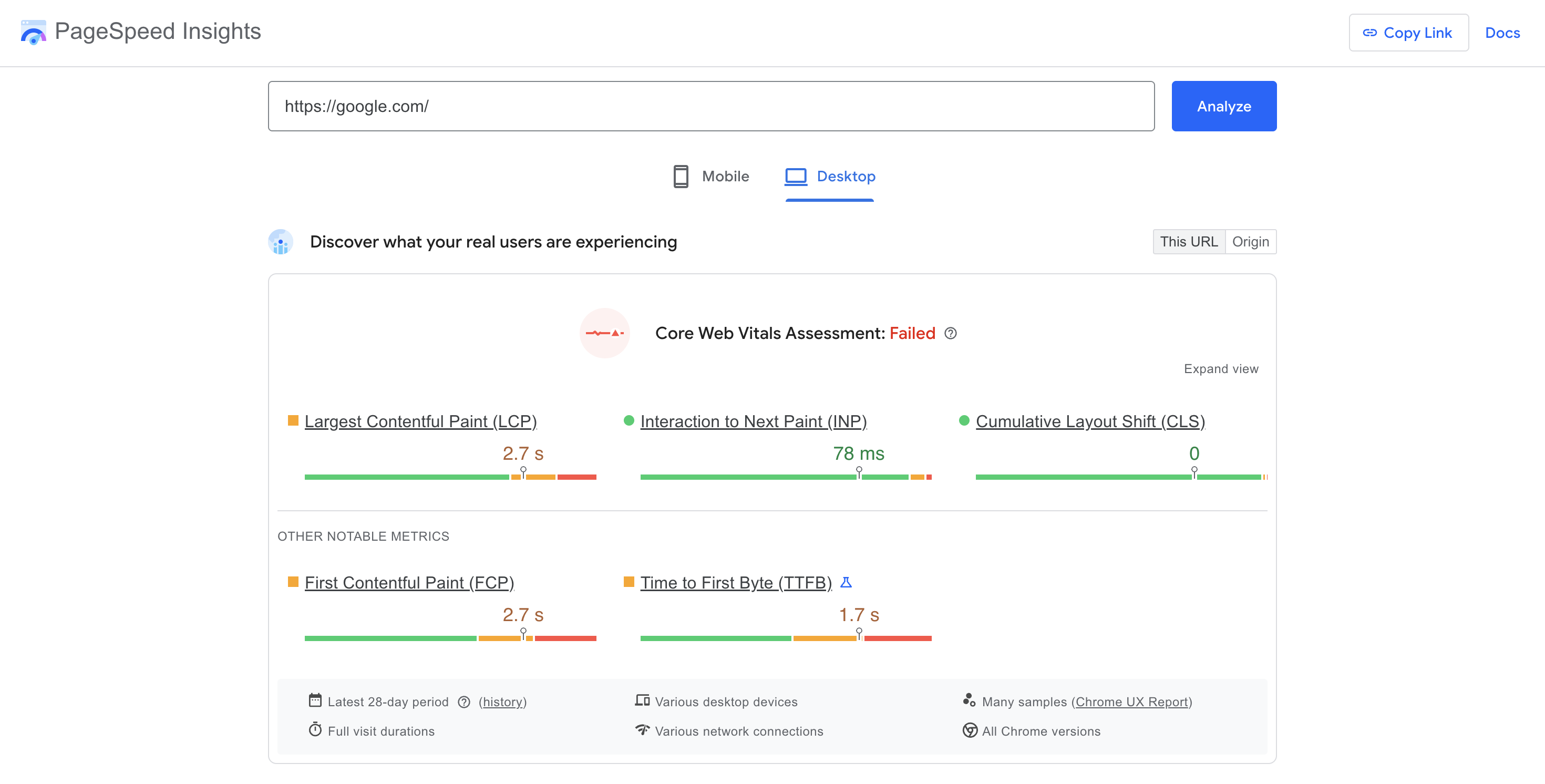
PageSpeed Insights is helpful on a page-by-page basis.
6. Prioritize accessibility
Accessibility has moved from "nice to have" to a genuine legal and business risk in 2026. E-commerce sites are disproportionately targeted by accessibility lawsuits—one analysis found 77% of website accessibility lawsuits target e-commerce businesses specifically, with complex interactive elements like carousels, filters, and checkout flows drawing the most scrutiny.
The standard to build toward is now WCAG 2.2, not 2.1. Level AA is the recognized benchmark for legal compliance, and WCAG 2.2's new Level AA additions — including minimum target size and ensuring focus indicators aren't obscured — are especially relevant for e-commerce interfaces. WCAG 2.2 added nine new success criteria overall, targeting users with low vision, cognitive and learning disabilities, and mobile users with motor impairments. It's expected to remain the practical compliance target through at least 2028–2030, since WCAG 3.0 is still years from becoming an official recommendation.
WCAG is organized around four core principles:
- Perceivable: Content is identifiable through sight, sound, or touch.
- Operable: Users can navigate with hands, voice, or assistive technology.
- Understandable: Content, interface, and layout are easy to follow.
- Robust: The site works across devices and technologies, including assistive ones.
Accessibility priorities for e-commerce
- Accessible authentication: One of WCAG 2.2's new requirements—login and checkout can't rely on a cognitive puzzle the user has to solve from memory, and password fields must support paste and password managers.
- Target size: Buttons, especially "Add to Cart" and checkout controls, need to meet minimum tap-target sizing.
- Contrast ratio: Maintain at least 4.5:1 for normal text and 3:1 for large text and key visual elements. WebAIM's contrast checker is a fast way to test this
- Accessible iFrames and asset attributes: Add alt text to embedded video and clear titles/captions to every media asset so screen readers can describe them accurately.
If you're using a CMS, check whether it lets you manage these attributes — alt text, captions, video descriptions — directly in the editor, rather than requiring a developer for every content update.
You can further improve contrast by using multiple visual elements to convey information, not just colors. This means using other visual cues like arrows, asterisks, and bold and italic font formats to highlight important texts like calls to action.
Define assets attributes
Asset attributes like titles, alt tags, and captions provide additional information about media elements on your website. Assistive technologies like screen readers use asset attributes to describe content to users with cognitive disabilities.
You can define asset attributes in your content management system, depending on its configurations. For example, if you use Storyblok, you can add new asset attribute fields in the Visual Editor.
Accessibility is also a core Google Lighthouse performance metric, making this an especially important e-commerce best practice to focus on.
6. Personalize without disrupting the customer journey
AI is changing how e-commerce brands personalize the shopping experience. By 2025, an estimated 80% of e-commerce brands were using AI to personalize shopping experiences, according to Statista, with tools like recommendation engines and AI chatbots boosting conversions by up to 30% in some cases.
That said, personalization is bigger than product recommendations:
Localize for language and currency
If you serve customers across different markets, localize the experience for their language and currency. Shoppers are more likely to trust a site that uses their language and displays prices in their currency.
Honor the organic user journey
Traffic arrives from many different sources—ads, organic search, AI recommendations, social links—and each carries different intent. If a segment consistently arrives from an Instagram ad for a specific product, that link should land on that product, not your homepage. Forcing a generic journey on a visitor who arrived with a specific intent is one of the easiest ways to lose them.
Caution: Don't force a user journey that isn't there. Time spent optimizing a page for the audience actually looking for it beats time spent trying to redirect disinterested traffic.
Never try to force a user journey! Your time and resources are valuable. They’ll be better spent optimizing a page for the audience that’s actually looking for it rather than trying to get it in front of disinterested users.
8. Make products easier to find
Good navigation helps shoppers find what they came for without unnecessary friction.
- Organize your menus into clear, logical categories and subcategories rather than a single overwhelming list. Amazon's approach of having a handful of top-level categories with a "See all" option keeps menus useful without intimidating new visitors.
- Make search unmissable. It should be visible and obvious on nearly every page, with the notable exception of checkout, where minimizing distraction matters more.
- Keep top-level navigation focused. Keep the top-level menu for essentials such as popular categories, account settings, high-traffic pages, and push secondary links (like customer service) to the footer.
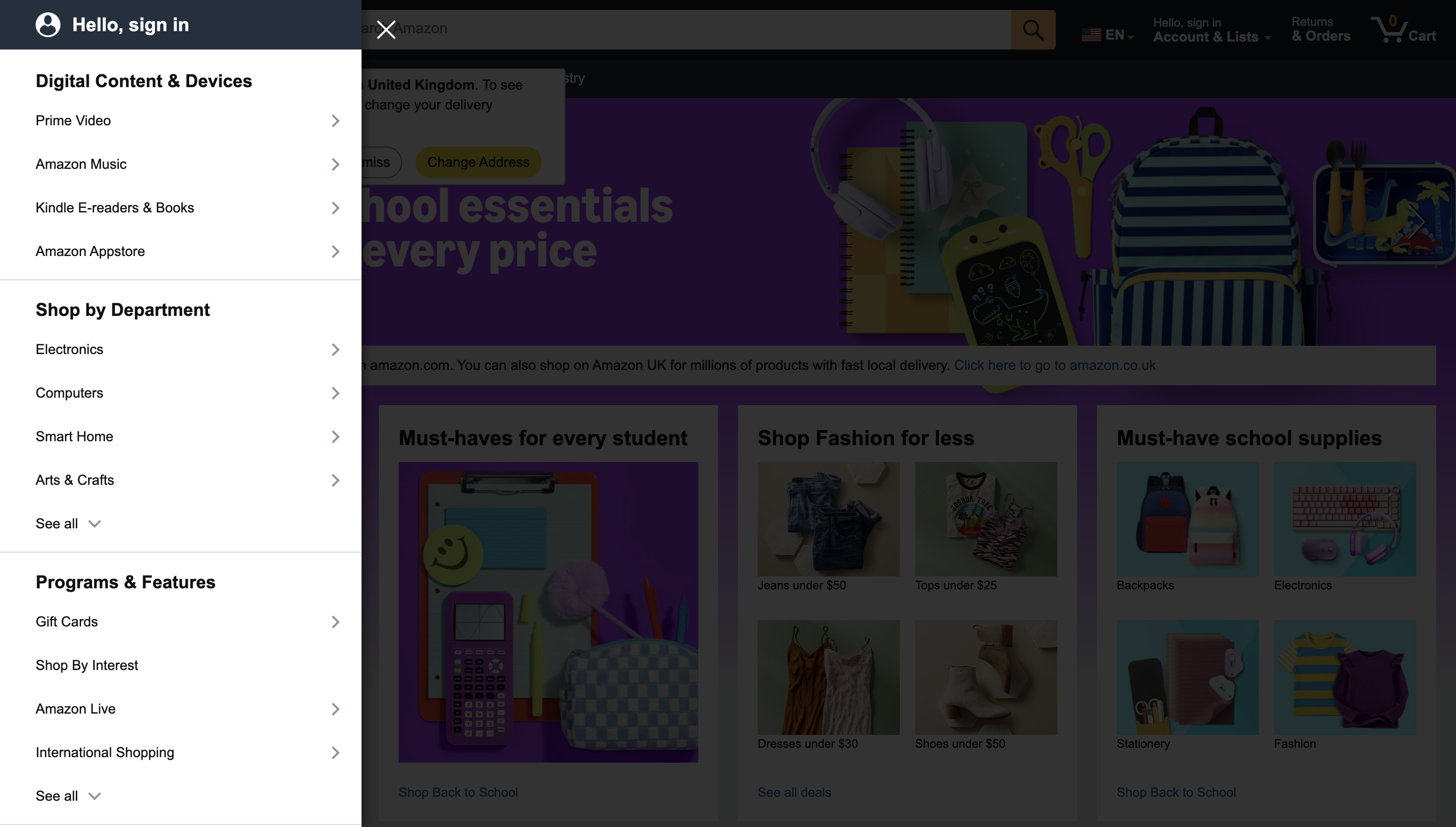
The sidebar menu of Amazon's homepage.
9. Show them what they’re getting
Online shoppers can't physically handle a product before buying, so the burden is on you to close that gap.
What they see
High-quality, consistent images from multiple angles are table stakes. For products used in motion, add video. AR can also help shoppers visualize furniture in their space or see how clothing might look on them.
What they read (and watch)
Product descriptions still need to be informative and SEO/GEO-friendly, but don't stop at specifications and include the emotional payoff of the product too: what problem it solves, how it feels to use. Video-based user-generated content has become an important conversion tool in e-commerce. If you're only collecting written reviews, consider giving customers a way to share video too.
10. Earn their trust
If you're not already a household name, trust has to be built deliberately.
Focus on security
Use HTTPS throughout your site, minimize third-party plugins, and use read-only APIs wherever possible to limit what's exposed if something goes wrong.
Feature user-generated content
Reviews, testimonials, and social proof still do heavy lifting. Consumers in 2026 are more selective and take more time comparing products and reading reviews before buying than they used to, which makes this content more valuable, not less.
Be consistent
Keep branding, tone, and layout stable across the site. Inconsistency reads as unprofessional and erodes the trust you've worked to build elsewhere.
11. Be ready to retarget
Visitors who leave without buying have still signaled real intent and your job is capturing it efficiently, without becoming a nuisance.
- Segment your audience. Cart abandoners, product browsers, and past purchasers all need different messages and different urgency levels.
- Use dynamic retargeting to remind visitors specifically of products they viewed, not generic ads.
- Set frequency caps. Sending three recovery emails instead of one recovers roughly 37% more carts, but there's a real ceiling before repetition starts to annoy rather than convert.
- Retarget across devices, not just the one a visitor first used.
- Offer real incentives when it counts. Personalized recovery emails convert about 2.5 times better than generic ones, and SMS recovery sees roughly 26% higher recovery rates than email alone. A small discount or limited-time offer may be enough to bring some shoppers back.
Key takeaways
E-commerce conversion still depends on making it easy for shoppers to find, evaluate, and buy the right product. Start by fixing the friction that affects customers today, from checkout and performance to accessibility and navigation.
At the same time, prepare for how shopping is changing. Accurate product data and structured content help your products stay discoverable as AI plays a bigger role in how people search, compare, and buy.