How to Choose a Mobile CMS: A Complete Guide

Storyblok is the first headless CMS that works for developers & marketers alike.
Mobile accounts for roughly 60% (opens in a new window) of global e-commerce sales and around 73% (opens in a new window) of e-commerce site traffic worldwide. For e-commerce businesses, that makes effective content delivery across mobile devices an important consideration when choosing a CMS.
Mobile content delivery also extends beyond responsive websites and apps. Content may now be accessed and used through AI assistants and other digital interfaces, creating additional requirements for how it is structured, managed, and delivered. This guide explains what to look for in a mobile CMS and how those requirements are evolving.
What exactly is a mobile CMS?
Depending on your perspective, "mobile CMS" can mean two different things:
1. A CMS for managing mobile apps: The content behind a native app (product data, screens, promotions, in-app messaging) for an online store, media brand, or service.
2. A CMS for managing mobile websites: Content for browser-based experiences specifically optimized for phones and tablets.
For a clothing brand selling through an app, every product might have a description, a dedicated page, and several images, alongside brand content that isn't tied to a specific product. Managing this content across different seasons, regions, and promotions adds complexity, particularly when the same catalog also needs to be maintained on the website.
Why this decision matters more than it used to
The gap between mobile traffic and mobile revenue is one of the more persistent puzzles in e-commerce: mobile drives the large majority of visits, but desktop still converts at roughly 1.5 to 2 times (opens in a new window) the rate of mobile web. The gap between mobile traffic and mobile revenue remains a challenge in e-commerce: mobile drives the majority of visits, while desktop often converts at a higher rate. Screen size and differences in shopping behavior can contribute to this gap, but the quality of the mobile experience also matters. Slow-loading pages, content that isn't optimized for smaller screens, and lengthy app update cycles can all create friction for mobile shoppers.
Three approaches to mobile content management
1. Not using a dedicated CMS (app as content storage)
The simplest and generally worst option is storing content directly inside the app's native code, with no CMS layer at all. It seems easy at first, but the downsides compound quickly:
- Slow user experience: Content stored locally demands more processing on the user's device, leading to sluggish, unresponsive sessions.
- Lengthy content updates: Since content is baked into the app itself, every update counts as an app update, meaning a resubmission to the app store for something as small as fixing a typo.
- No link between apps: Running the same app on multiple operating systems, or multiple apps altogether, means treating each as fully isolated. Hence, every change has to be applied manually, everywhere.
- No link to other digital touchpoints: If you also have a website, content can't be shared between the two. Everything gets built and maintained twice.
- Complicated personalization: When updating content is already this slow, any real personalization effort stalls before it starts.
This approach can work for an app with an extremely small, rarely-changing set of content. For most catalogs, especially e-commerce ones, it isn't viable.
2. Using mobile BaaS as a CMS
Backend-as-a-Service (BaaS) solutions store content outside the app in a hosted backend, which solves some of the problems above. But BaaS tools are built to be a backend, not a content management system, and they typically lack real editorial tools, workflows, and approval processes, and they're built for developers, not the marketers and content editors who actually need to publish day-to-day. And like the first option, BaaS doesn't help with your mobile website, and you're still running two disconnected systems.
3. Using an API-first headless CMS
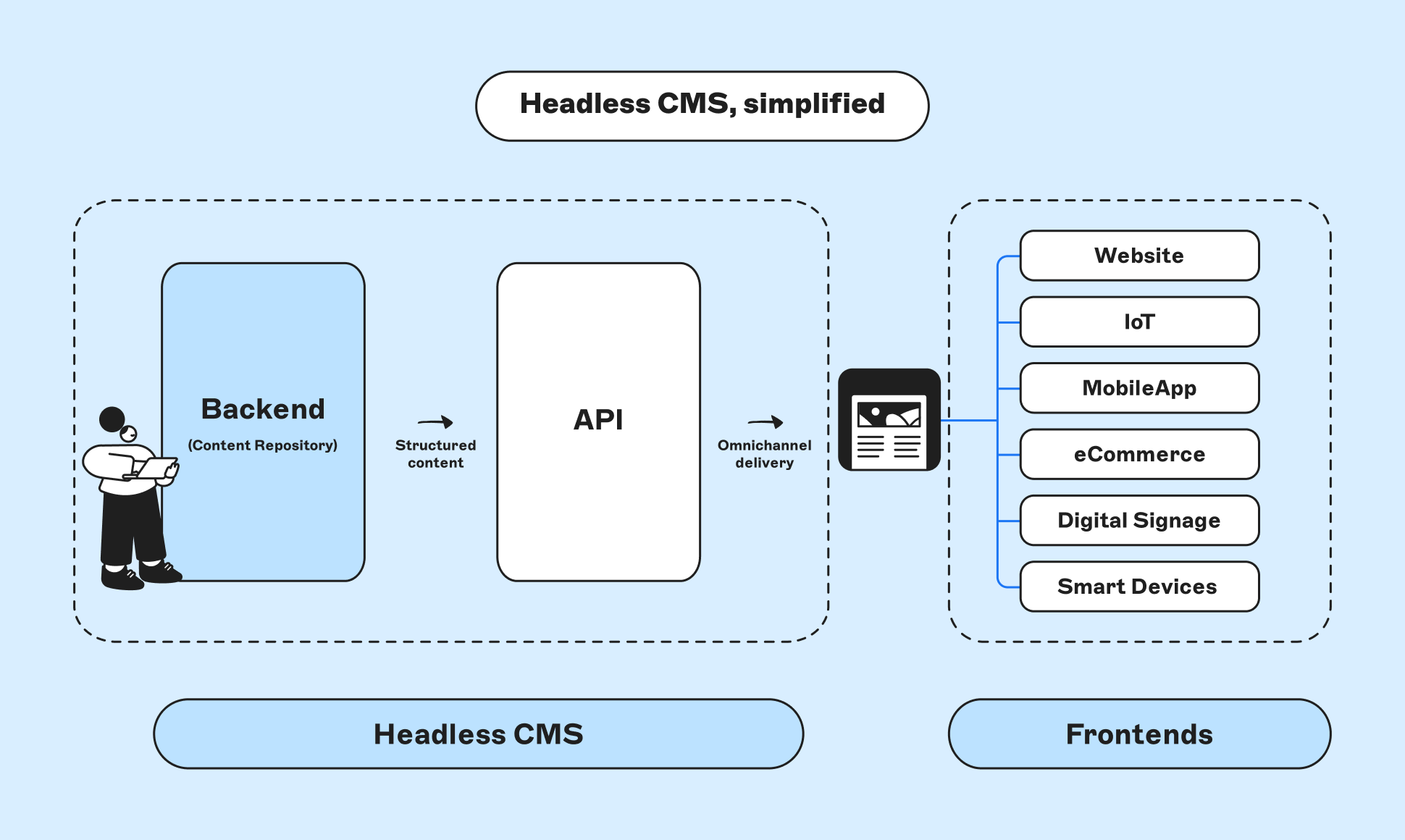
Most businesses need to serve an app and a website with the same quality and the same underlying content. That's the case for an API-first, headless CMS: content lives in one central hub and gets delivered wherever it's needed—app, website, smartwatch, kiosk, voice assistant—through APIs.
APIs work as interfaces that define the interactions between different software intermediaries. The common analogy used to describe them is “waiters in a restaurant”: they are the “interface” customers have to deal with, without worrying about whatever goes on in the kitchen. This means easy access to services without directly interacting with the “engine”.
Headless simply means the front end (the "head" what people see) is decoupled from the back end (the "body"—where content lives). One body, as many heads as you need.
If you want a deeper look at headless architecture generally, this explainer covers it well.
Look for native mobile SDKs, not just raw API access
Choosing an API-first headless CMS solves the "one content hub, many channels" problem, but for native mobile apps specifically, raw API access is only half the story. A REST or GraphQL response still has to be parsed into typed models, mapped to UI components, and cached for offline use—work that falls entirely on the mobile team unless the CMS also ships a native SDK. When evaluating options, look for one that provides purpose-built SDKs for the frameworks you're actually building with, such as Jetpack Compose on Android or SwiftUI on Apple platforms, so content blocks translate directly into native UI components instead of raw JSON you have to wire up yourself.
How AI is reshaping the mobile CMS decision
AI is adding new considerations to the mobile CMS buying process, from content workflows to how content is structured and delivered.
AI inside the content workflow
Modern headless CMS platforms increasingly build AI directly into content operations: generating first drafts, auto-tagging assets, suggesting alt text, and flagging content that needs localization. These capabilities can reduce some of the manual work involved in managing content across multiple app screens, channels, and locales.
Structured content for AI-powered experiences
Structured content has benefits beyond content reuse and multichannel delivery. Clearly defined content types, fields, relationships, and metadata can also make it easier for AI systems to identify and retrieve the information they need.
For example, product information stored in dedicated fields can be accessed independently rather than extracted from a larger block of page content. The same applies to mobile content such as product catalogs, onboarding flows, or in-app help. When that information is structured consistently, it can be more easily reused across search, retrieval, translation, and AI-powered experiences.
This doesn't mean unstructured content can't be used by AI. But a well-defined content model provides additional context about what information represents and how different pieces of content relate to one another. For teams evaluating a mobile CMS, content modelling is therefore increasingly relevant not only to how content is delivered today, but also to how it may be used by AI-powered experiences.
Composable architecture and MACH principles
Composable architecture is another important consideration when choosing a mobile CMS. Instead of relying on a single platform for every capability, organizations can combine services for content management, commerce, search, personalization, and other functions through APIs.
This is usually described by the acronym MACH: Microservices, API-first, Cloud-native, Headless. These principles support a composable approach in which individual capabilities can be selected, connected, and changed independently.
For a mobile CMS specifically, MACH alignment matters because:
- A composable approach makes the CMS one component of the wider technology stack. This can make it easier to change commerce, search, or personalization tools without replacing the content platform itself.
- An API-first CMS can deliver the same content to multiple frontends, including websites, mobile apps, and other digital experiences, without tying content to a specific presentation layer.
- A composable stack also requires integrations between its different services. When evaluating a CMS, consider how easily it can connect with the commerce, search, personalisation, and other tools in your existing stack.
| Traditional CMS | Headless CMS | |
|---|---|---|
| Approach | Monolithic | Headless through APIs |
| Targeted Devices | Web-only | All devices |
| Setup | Based on specific CMS rules | Based on your existing tech stack |
| Coding | Co-existing content, CMS, and Front-end code creates dependency, making each addition a complex task | Content is independent and works with API calls. Any new "head" can be added with simplicity |
| Customer's Interface | Pre-built templates with minor customization possible | Absolute control over the presentation of content |
| Technology Choice | Dictated by the CMS | Free Choice |
| Redesign | Requires modifying the whole system | Changes are isolated |
| AI/structured-data readiness | Often limited by rigid templates and mixed content/markup | Native fit—typed fields, addressable via API |
| Composable/MACH fit | Requires significant retrofitting | Built for it |
A few signals that a headless CMS is the better fit for your business specifically:
- You want content and product experiences that stand out with a brand-specific, tailored feel rather than a templated one.
- Speed matters. Both site/app performance and how fast personalized content reaches the user.
- You need genuine omnichannel and cross-platform support, not just a responsive website
- You publish a high volume of content, or update it frequently.
- You expect to plug AI tools, agents, or new device types into your stack without a platform rebuild.
Mobile-first content modeling
When modeling content for mobile, focus on structure rather than a specific page layout. Content that is broken into clearly defined fields and reusable components is easier to adapt to different screen sizes and mobile experiences.
- Keep content separate from presentation. Model information according to what it represents rather than where it appears on a page. This gives frontend teams more flexibility in how content is displayed on different devices.
- Use reusable components where appropriate. Structured components can be combined and presented differently across websites, mobile apps, and other channels without creating separate versions of the same content.
- Consider what each channel needs. Mobile experiences may require shorter text, different imagery, or other variations. Your content model should accommodate these differences without duplicating entire pieces of content.
- Preview and test content on mobile. Check how content appears on smaller screens and in the actual mobile experience rather than relying only on a desktop preview.
Mobile Content Management Checklist
If you're evaluating a new mobile CMS, here's what to actually look for:
- Supports both app(s) and website(s) from the same content hub, not two disconnected systems.
- Omnichannel delivery. APIs allow content to be delivered to websites, mobile apps, and other digital channels without tying it to a specific frontend.
- Non-technical editing. Marketers and content editors can create and publish content without relying on developers for every change.
- Content automation and reusability. Modular content can be reused and adapted across different channels and experiences.
- AI-readiness. Structured content and metadata can make information easier for AI-powered systems to identify, retrieve, and reuse.
- Composable architecture. An API-first CMS can integrate with commerce, search, personalization, and other services without requiring an all-in-one platform.
- Frontend flexibility. Teams can create custom experiences rather than being restricted to predefined templates.
- Framework-agnostic, with native SDK support. Developers can use the framework that fits the project (React, Vue, Swift, Kotlin, React Native, Flutter), backed by native SDKs—e.g. Jetpack Compose, SwiftUI—that map content directly to UI components and handle offline caching.
Where to begin
If you don't currently use a CMS, start by testing API-first platforms against your requirements. A free trial can help you evaluate the editing experience and development workflow before committing.
If you're migrating from a traditional CMS, define your requirements, migration scope, and timeline before comparing platforms. Use the criteria above to identify which options best match your needs.
If native mobile is a priority, don't stop at the editing UI. Pull up the SDK docs and wire up a single screen with real content. That's the fastest way to see whether "native SDK support" on paper actually holds up in your codebase.
Frequently asked questions (FAQs)
What's the difference between a mobile CMS and a headless CMS?
They're not mutually exclusive—a "mobile CMS" describes the use case (managing content for apps and mobile-optimized sites), while "headless CMS" describes the architecture that makes serving that use case well actually possible. Most CMS platforms marketed specifically for mobile today are headless under the hood, since a headless, API-first architecture is what lets one content hub feed an app, a website, and any other channel at once.
Do I need a separate CMS for my app and my website?
No, and this is one of the more expensive mistakes to correct after the fact. An API-first headless CMS can serve both from the same content hub, which means content only has to be created and updated once. Running separate systems for app and web means duplicating content, doubling update effort, and risking inconsistent messaging across channels.
Can a headless CMS handle content updates without an app store resubmission?
Yes. That's one of the main reasons to use one. Because content lives outside the app's native code and is delivered via API, updating a product description, promotion, or screen doesn't require shipping a new app build. Only changes to the app's actual functionality or code require a resubmission.
Is a headless CMS harder for non-technical marketers to use than a traditional CMS?
It depends on the platform, not the architecture. Early headless CMS tools were criticized for this, because content teams couldn't see what they were building without a developer setting up a preview. That gap has closed significantly: real-time visual editors and live preview tools are now standard across most modern headless platforms, so non-technical editors can work visually while developers still get a fully decoupled delivery layer.
What is MACH architecture, and do I need it for a mobile CMS?
MACH stands for Microservices, API-first, Cloud-native, and Headless. It's the architectural principle behind composable tech stacks, where you assemble best-of-breed tools (CMS, commerce, search, personalization) instead of buying one all-in-one platform. You don't strictly need full MACH compliance to manage mobile content well, but choosing a genuinely API-first CMS keeps that option open as your stack grows, rather than locking you into a single vendor's ecosystem.
How does AI change what I should look for in a mobile CMS?
AI affects the decision in three ways: AI features built into the CMS itself (content generation, auto-tagging, translation), personalization that increasingly runs at the edge for speed, and whether your content is structured enough for AI systems to reliably read and cite it. Content stored as clean, typed fields is far easier for AI tools (in-app assistants, AI search engines, internal automation) to use accurately than content stored as unstructured rich text.
Should I choose a CMS built specifically for mobile apps, or a general headless CMS?
Generally, a general-purpose, API-first headless CMS is the safer choice. Mobile-only platforms tend to leave your website as a separate problem to solve, which reintroduces the duplication issue this whole guide is trying to help you avoid. Look instead for a headless CMS with strong native mobile SDKs, an image/CDN pipeline suited to phones, and support for offline sync, rather than a platform that treats mobile as its only channel.
What should my content model actually look like for mobile?
Design it from the smallest screen up: keep field sets compact, give every field a clear mobile use case, and break large page templates into small, independently loadable components. This produces leaner API responses, which matters more on mobile networks and cellular connections than almost anywhere else in your stack.
Is mobile web or a native app the better investment for content management?
This guide assumes you need both, which is true for most established e-commerce and content businesses. Mobile drives the majority of traffic, but conversion behavior differs meaningfully across mobile web, native apps, and desktop. The CMS decision matters less here than making sure whichever channels you support are fed from one unified content source, so quality and messaging stay consistent regardless of where a customer shows up.
Does Storyblok have a native mobile SDK?
Yes. Storyblok ships official SDKs for Android (built for Jetpack Compose) and Apple platforms (built for SwiftUI), including story fetching, block and rich text rendering, and offline support out of the box. See the release notes (opens in a new window) for details.