What Is a Web CMS? Definition, Types, and Examples

Storyblok is the first headless CMS that works for developers & marketers alike.
A web content management system (CMS) changes that by giving teams a central system to create, organize, and publish content, though how much of that a marketer can do without a developer depends on the platform.
This guide covers what a web CMS is, the main architectures behind it, and how to choose the right one.
Quick overview
- A web CMS separates content management (where you create content) from content delivery (where it's published).
- That separation works differently depending on the architecture: monolithic, decoupled, headless, or hybrid.
- Headless CMSs deliver content to any channel via API, not just a website.
- Choose based on ease of use, channel needs, developer flexibility, security, and implementation speed.
- Try Storyblok Free to see a headless CMS with a Visual Editor in action.
What is a web CMS?
A web CMS is software that lets marketers and developers create, edit, organize, and publish website content from a central system, without building or maintaining a website from scratch. It's built from two connected parts:
- The content management application (CMA): the backend repository where your team creates, edits, and stores content: pages, blog posts, product descriptions, images.
- The content delivery application (CDA): the part that takes that content and shows it to visitors on your live site.
When someone visits a page on your website, the CDA is what makes that happen: it fetches the right content from the CMA, drops it into the correct design, and displays it in the visitor's browser. This all happens in the background, in a fraction of a second, so visitors never see the two systems working separately.
What differs between CMS platforms is how closely connected these two systems are, and that difference has a name: architecture. Some platforms bundle the CMA and CDA together into one connected system. This is called a monolithic CMS, and it's the traditional setup most people picture when they think of a CMS.
Other platforms fully separate the two. This is called a headless CMS: the CMA still stores and manages your content, but instead of being tied to one built-in design system, that content can be sent to any website, app, or device that requests it.
Read Headless CMS Explained to unpack what headless architecture is, how it works, and where it fits compared to other approaches.
Why does this matter to you? Because it affects two very practical things: how much freedom your developers have to build the site the way they want, and how many places you can publish the same content without extra work.
We'll walk through both architectures, plus two other variations, in more detail later in this guide.
How does a web CMS work?
- A content creator logs into the CMA and drafts or edits a piece of content.
- The content is saved to the central repository with metadata: author, status, publish date, SEO fields.
- It moves through any assigned workflow: review, approval, scheduling.
- On publish, the CDA retrieves the finished content and renders it live, in the correct template, on the right channel.
Is a web CMS the same as a CMS?
Not exactly, though the terms are often used interchangeably. A CMS is the broader category: any system that manages digital content, including content for apps, kiosks, intranets, or connected devices, not just websites. A web CMS is the subset of CMS focused specifically on managing content for websites and web applications.
The distinction matters most when you're evaluating a platform: does it only publish to your website, or can it also serve your app, your voice assistant, or an in-store kiosk from the same content? This is the same shift driving enterprise omnichannel strategy today.
What are the core capabilities of a web CMS?
1. No-code content management
Many web CMS platforms let non-technical team members create, edit, and publish content without a developer touching the code each time. Without this, your marketing team can't launch a landing page or fix a typo without filing a developer ticket. How content is structured behind the scenes, content modeling, is what determines how flexible that no-code editing actually is.
2. A central content repository
All your content lives in one place, accessible at any time. This reduces duplicated assets; you can check whether something already exists before creating it again, and it keeps content from getting lost across scattered files or tools.
3. User administration and workflow roles
Most web CMS platforms use role-based permissions and login credentials, paired with an admin dashboard for managing content, users, and performance metrics. You can assign roles, editor, developer, marketer, approver, so contributions move through a clear, accountable process. Getting this right also matters for security: see how insider threats can affect under-managed permission structures.
4. Collaboration and publishing tools
Multiple people can work on the same content pipeline at once: drafting, reviewing, adding search engine optimization (SEO) metadata, and publishing. Clear workflow states (draft, in review, published) keep content from going live before it's ready—see six ways marketers and developers can collaborate better for how this typically plays out day-to-day.
Common use case for a web CMS
| Use case | Purpose |
|---|---|
| Public website | Manage your main, customer-facing site |
| Intranet | Manage internal company information for employees |
| HR portal | Publish and update employee-facing HR content |
| Microsite or landing page | Launch campaign pages fast, often outside your main site structure |
| eCommerce store | Manage product and category content alongside a storefront platform |
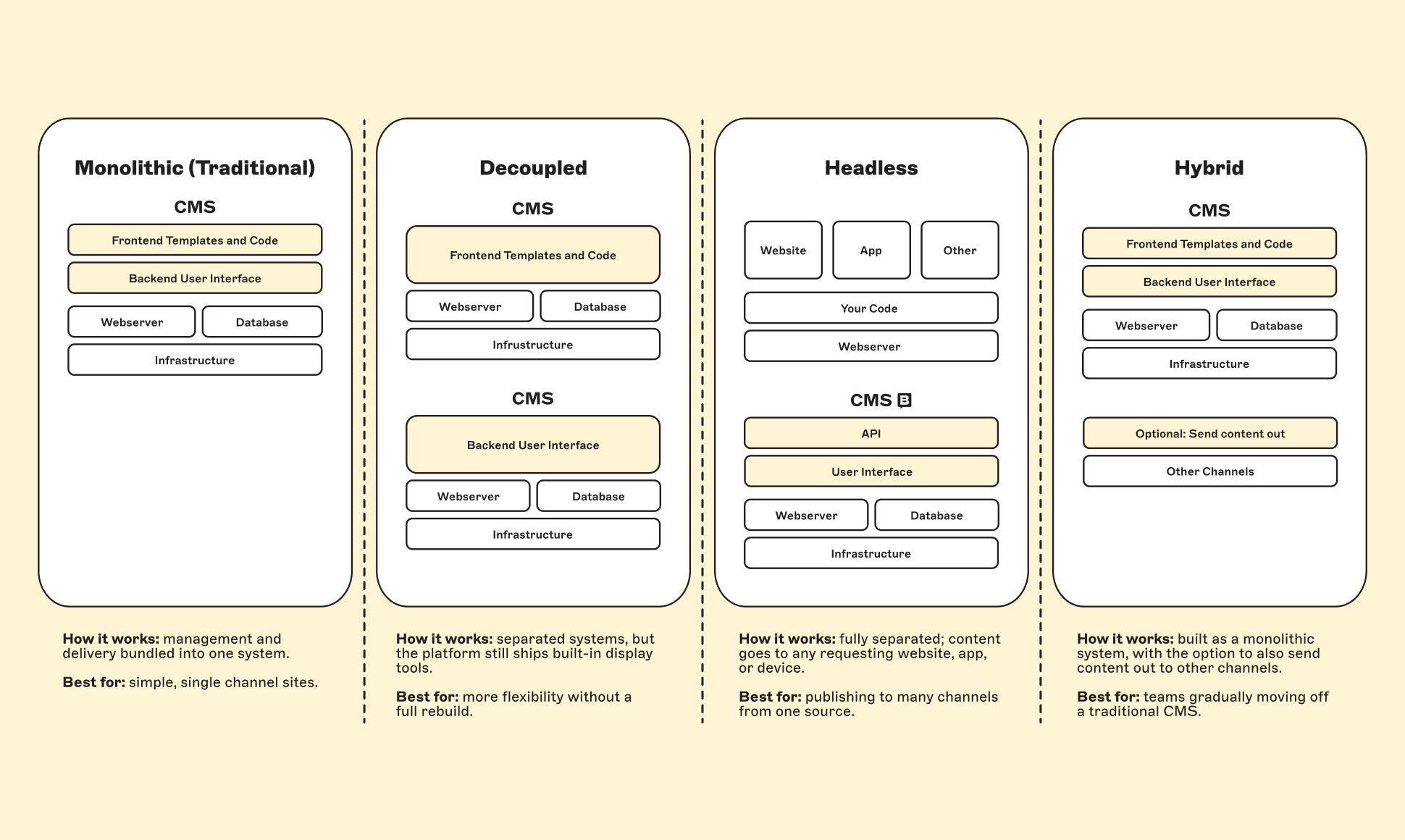
What are the main types of web CMS?
Not every CMS connects its content management and content delivery systems the same way. How tightly (or loosely) they're connected is what defines a platform's architecture, which is one of several factors in what you can and can't do with it. These are the four main types:
| Type | How it works | Best for |
|---|---|---|
| Monolithic (traditional) | Content management and content delivery are bundled into one system | Simple, single-channel websites |
| Decoupled | The two systems are separated, but the platform still provides some built-in tools for displaying content | Teams wanting more flexibility without a full rebuild |
| Headless | The two systems are fully separated; content can be sent to any website, app, or device that requests it | Brands publishing to a website, an app, and other channels from one content source |
| Hybrid | Built as a monolithic system, with the option to also send content out to other channels | Teams gradually moving away from a traditional CMS |
Monolithic and headless sit at opposite ends of that spectrum, so we'll cover those two in more detail below. Decoupled and hybrid are worth a look too, and we link out to deeper guides on both above.
Monolithic CMS
In a monolithic CMS, the systems that manage your content and the systems that display it are built as one connected unit. That gives it three concrete advantages for the right use case:
- Fast to launch. Everything you need (templates, hosting, design tools) is built in from the start, so a single site can go live without a separate frontend build.
- One system to manage. Content and presentation live together, which means one platform to maintain, update, and secure rather than several connected pieces.
- Simpler for smaller teams. There's less coordination needed between developers and marketers, since there's only one system for both to work in.
The tradeoff shows up as needs grow: Showing the same content in a mobile app or on a smartwatch usually means adding a separate system, since content is tied to the website, and a redesign often means reworking the whole system rather than just the page you want to change.
WordPress and Drupal are the best-known monolithic examples, though both now offer headless configurations too.
Headless CMS
A headless CMS takes the opposite approach: it fully separates where your content is stored from how and where it's displayed. Content lives in one central place and can be delivered to a website, an app, a voice assistant, or an in-store screen through an API-first architecture, a way of connecting systems that lets any of these channels request and receive your content directly.
That separation gives teams three concrete advantages over a monolithic setup:
- Freedom to choose your tools. Sometimes called best-of-breed architecture, this means your developers can combine whichever design tools they prefer with whichever backend stores your content, instead of being locked into one vendor's full package. See how this plays out with Shopify as a backend and Storyblok as the frontend.
- Publish once, everywhere. One content source powers every channel at once, so a campaign can launch on your website and app simultaneously instead of one after the other.
- Less waiting on each other. Developers and marketers work at the same time, since updating content doesn't require a code change, and changing the code doesn't require re-entering content.
Put side by side, the practical differences look like this:
| Monolithic CMS | Headless CMS | |
|---|---|---|
| Channels supported | Website | Website, apps, wearables, voice assistants, and more |
| Setup | Built-in templates and tools, ready to launch | Built around your team's own tools and frontend |
| Customization | Pre-built templates | Custom-built presentation layer |
| Technology choice | Set by the CMS vendor | Chosen by your developers |
| Redesigns | Usually require reworking the whole system | Handled on the frontend, separate from content |
Read Best-of-Breed vs. All-in-One Systems to see how decoupled architecture fits your stack, or Hybrid CMS vs. Headless CMS to weigh a gradual migration path.
Do you need a headless CMS?
With the differences laid out, the real question is whether they apply to you. Consider headless if most of the following are true for your team:
- You want to publish the same content to more than just your website. For example, a mobile app, a voice assistant, or connected devices (sometimes called the Internet of Things, or IoT)
- Your developers want the freedom to choose their own design tools and technologies (often called a frontend framework) rather than being limited to what one platform provides
- Your marketing and development teams are often waiting on each other to make updates
- You're planning a redesign and want to avoid rebuilding all of your content at the same time
If none of these apply and you're running a single, straightforward website, a monolithic CMS is often the simpler and faster choice.